

Article written by Kirstie Murray from Cambourne Village College, Cambridgeshire
Speaking as a pen-and-paper girl rather than a digital native, the use of technology has always seemed more like an addition within the classroom than a tool capable of developing teaching and learning.
This blog isn’t intended to present a sweeping argument about the utility or otherwise of technology in the classroom, but rather hopefully provide some models that other teachers could tentatively embrace within their own lessons.
I present two small case studies where I think that technology can play a role, primarily because what it can give teachers in terms of access to resources and how student revision of factual knowledge can be accelerated.
For context, I teach in a large comprehensive state secondary school where all pupils have an iPad though a hire purchase scheme.
Access to resources
One of the main ways I have found the iPad to be useful in the classroom is how it provides ready access to resources. Instead of printing a class set of reading material for example, we upload documents on Microsoft Teams and the pupils can access any time. There are clearly several advantages to this. Firstly, all pupils can access the texts both in class and later if they need to for homework or revision. For our school setting there are a number of pupils in alternative provisions or educated off site and, like all schools, some not in the lesson for a range of usual reasons. Resources on Teams make lessons (somewhat) accessible to those not present in the room. Another benefit of the use of the iPad is that we need to spend much less money and time printing paper resources. Online nothing is lost or needs to be dug out of the filing cabinet next year. For pupils who prefer to read with an alternative font, different coloured background or need to access a quick translation of a word into their home language, they can do so independently.
This is probably the most basic use one could imagine in terms of iPad use. I would be willing to bet that many teachers do this daily. That said, the ability to share a high-quality text or image with pupils is not to be underestimated.
QR code quizzes
My greatest success in using iPads in class is not in the use of Microsoft Teams or in the sharing of resources, but in the creation of QR Code quizzes.
Within the suite of programmes available to teachers at my school is access to Microsoft Forms. This is a web-based site for the creation of quizzes and forms; many of you I am sure will have come across it either in a workplace setting or when asked to complete online surveys. The format is extremely user friendly both to create quizzes and to complete, particularly so on the pupils’ iPad.
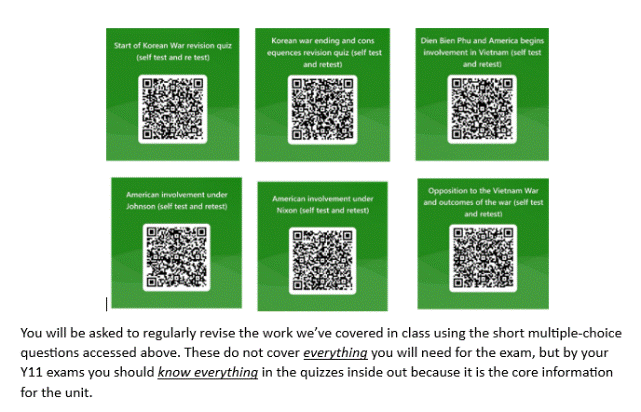
What has become a real mainstay of my teaching at KS4 this year is a bank of revision quizzes created on Microsoft forms. These are then shared as QR codes which can be scanned using the camera app on the iPad, taking the pupils directly to a bespoke, self-marking revision quiz.
There are many ways to set up multiple choice questions and online quizzing but these are some principles which have seemed to be successful for me this year and underpin my current use of ‘QR code quizzes’.
1. These quizzes are full of ‘fact’ questions. They are designed to test fingertip knowledge such as dates, names, places, statistics, events, and key terminology. I have stayed away from attempting to assess understanding historical processes or developments, but rather kept the questions to those which could be marked automatically by computer without error.
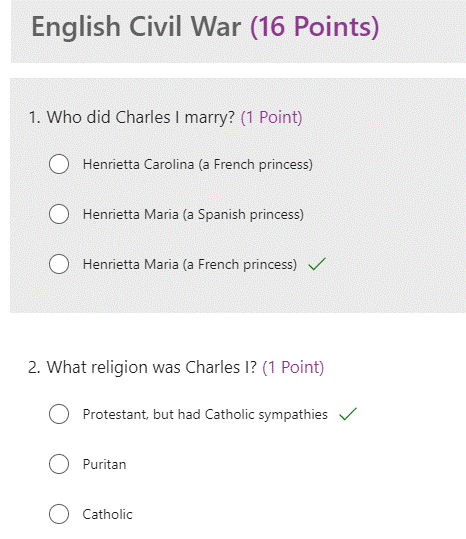
2. The quizzes are short and easy to complete, each around 15-20 questions. They cover discrete topics (the Peasants’ Revolt, Norman monastic life, the events of the Korean War etc.) and the questions have been designed to cover the core, basic knowledge which I think is essential for that topic.
3. All of the marking of the quizzes is completed instantly and automatically. By prepopulating the answers at the point of creating the quizzes, I can set the quiz to be self-marking and the pupils see their score immediately. They then also have access to the correct answers and can see in detail which questions they answered incorrectly.
4. All quizzes can be repeated by pupils as many times as they wish. They are encouraged to complete a quiz, see their score, view the correct answers and go right back in for another try. Many conversations have been had with pupils where they tell me at first their score was 10/15, but after two attempts they could answer all questions correctly.
5. The quizzes can be used by any pupils in the school. As a department we have shared access to the Forms across KS4 and this has helped enormously with setting the standard for what factual knowledge the pupils must have. Of course, once created the quizzes can be used year to year so the time and effort put into creating the quizzes has paid off!
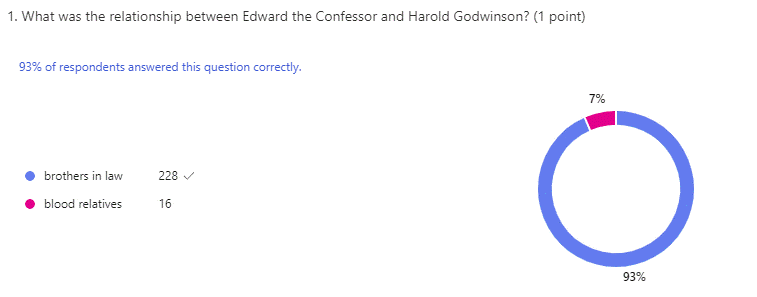
6. There is a feature on Microsoft Forms for teachers to see statistics about the completion and the success rates of the pupils. It reveals completion rates, attempts made and how many times pupils answer them. The purpose of the QR code quizzes was to help pupils take ownership of their revision and private study.
7. Student exercise books and the revision resources we provide to pupils now have the QR codes printed inside. This is part of an ongoing mission to help pupils see the wood for the trees as they are given the instruction to ‘revise’ without perhaps clear guidance about what exactly to do or what to choose to remember.
8. The QR codes are easily used as revision activities or retrieval practice at the start of lessons. Pupils are now in the habit of spending a few moments most lessons completing a quiz or two as I project the QR codes onto the whiteboard.
Next steps
I am now in a fortunate position where I now have an extensive bank of revision quizzes ready for use. What then could be the next steps to refine this further?
1. As a department we have pondered and experimented with AI to generate the quizzes for us, but always found the results disappointing. It has generated perfectly fine quizzes, but they weren’t maximising the fingertip, factual knowledge that we felt was core for KS4 pupils to know. Could there be a role for AI once we have better worked out how to use it? Would that speed things up or create more faffing about? Should I use more of the statistics generated by the quizzes to develop teaching further?
2. At the moment the quizzes are pitched at what I think a student on track for a Grade 5 or 6 should know. Part of the intention is to ensure we lift more pupils into a ‘good’ passing grade so have been careful to target the questions around that level. Could we investigate the wording in our questions to reach a more nuanced level of questioning which scaffolds answers up to a higher level?
3. Much of this may well be teaching grandmother to suck eggs. I am in no way a technological pioneer and much of what I have come to do is derived from practice I have seen in the classrooms of colleagues. I do hope though that, for those of us able to access some of these technologies or in situations where iPad use has become the norm, these ideas will provide some fuel for further innovation.
I would be very keen to hear from other teachers about how you have made technology serve a purpose in teaching history. I can be contacted on Bluesky @kirstiemurray.bsky.social
 OBHD
OBHD 